Skip to content

SystemAdminTalk

  • Home
  • Contact

Category: Microsoft

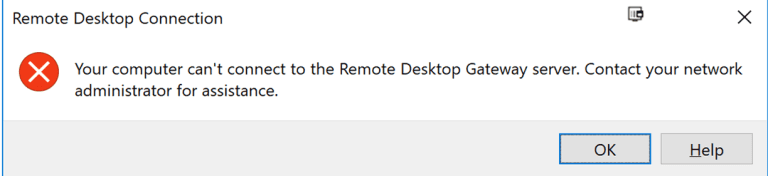
Failed to connect RDP “Your computer can’t connect to the Remote Desktop Gateway server”

Error: “Your computer can’t connect to the Remote Desktop Gateway server”


Solution: 

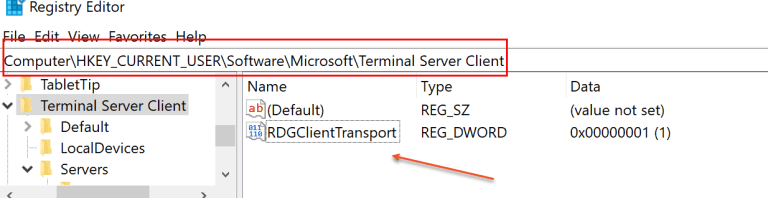
  • Open Registry using regedit command
  • Go to HKCU\Software\Microsoft\Terminal Server Client\
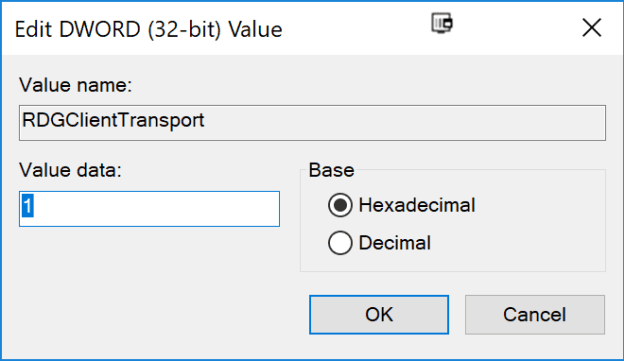
  • Create a new DWORD (32-bit) called: RDGClientTransport
  • Give it a Value of: 1
  • After updating registry restart server
harpalgohilon Microsoft 1 Comment 5th Oct 201810th Mar 2019 1 Minute
Blog at WordPress.com.
Privacy & Cookies: This site uses cookies. By continuing to use this website, you agree to their use.
To find out more, including how to control cookies, see here: Cookie Policy
  • Subscribe Subscribed
    • SystemAdminTalk
    • Already have a WordPress.com account? Log in now.
    • SystemAdminTalk
    • Subscribe Subscribed
    • Sign up
    • Log in
    • Report this content
    • View site in Reader
    • Manage subscriptions
    • Collapse this bar
Design a site like this with WordPress.com
Get started