Install and Configure Apache in Centos 7

Description:  Here I have explained how to install and configure Apache in Centos 7

Procedure:

  • First you need to install httpd using yum

# yum -y install httpd

  • After installation you need to start and enable service 

# systemctl  enable httpd.service
# systemctl start httpd.service

  • Configure firewall to allow httpd traffic using below command 

# firewall-cmd –zone=public –permanent –add-service=http
# firewall-cmd –zone=public –permanent –add-service=https
# firewall-cmd –reload

  • Test your installation by browse default page in browser 

http://SERVER_DOMAIN_NAME_OR_IP

Configure Name Based Virtual Host: 

  • If you have more than one domain need to host on same server then you need to configure Name based virtual host. 

Procedure: 

  • First create vhost.conf file under /etc/httpd/conf.d/ to store multiple vhost configuration 

# vi /etc/httpd/conf.d/vhost.conf

Add the following example virtual host directive template for website testdomain.com, make sure to change the necessary values for your own domain

NameVirtualHost *:80

ServerAdmin master@testdomain.com
ServerName testdomain.com
ServerAlias http://www.testdomain.com
DocumentRoot /var/www/html/testdomain.com/
ErrorLog /var/log/httpd/testdomain.com/error.log
CustomLog /var/log/httpd/testdomain.com/access.log

######## Additional Domain ################

ServerAdmin master@testdomain2.com
ServerName testdomain2.com
ServerAlias http://www.testdomain2.com
DocumentRoot /var/www/html/testdomain2.com/
ErrorLog /var/log/httpd/testdomain2.com/error.log
CustomLog /var/log/httpd/testdomain2.com/access.log

  • Save file after make changes 
  • You can add more virtual host as you require. 
  • Make sure to create error log and custom log folder as defined in virtual host file.
  • Restart httpd service after chagnes

# systemctl restart httpd.service 

  • Now you can visit to testdomain.com 

Setup Apache Password Protected Directory with htpasswd

  • By default Apache does not allow the use of .htaccess files in CentOS 7. You will need to set up Apache to allow .htaccess based authentication. You can do this by editing the Apache config file

# vi /etc/httpd/conf/httpd.conf

Find the section that begins with . Change the line from AllowOverride none to AllowOverride AuthConfig


AllowOverride AuthConfig
  • Create a password file with htpasswd

# htpasswd -c /etc/httpd/.htpasswd user1

You will be asked to supply and confirm a password for user1.
.htpasswd file created  and it looks like as follow
 user1:$apr1$0r/2zNGG$jopiWY3DEJd2FvZxTnugJ/

  • Now, you need to allow the apache user to read the .htpasswd file.
# chown apache:apache /etc/httpd/.htpasswd
# chmod 0660 /etc/httpd/.htpasswd
Now you need to create a .htaccess file in the web directory you wish to restrict.
For this example, we will create the .htaccess file in the /var/www/html/ directory to restrict the entire document root.
vi /var/www/html/.htaccess
Add the following content:
AuthType Basic
AuthName “Restricted Content”
AuthUserFile /etc/httpd/.htpasswd
Require valid-user
  • Save file and restart service. 
  • Test it by browse URL in browser. You will prompt for username and password
Install and configure FTP in Centos 6

Description: Install and configure FTP in Centos 7

Procedure:

  • Enable epel repository by using below command

[root@localhost ~] # wget http://dl.fedoraproject.org/pub/epel/7/x86_64/e/epel-release-7-6.noarch.rpm

[root@localhost ~] # rpm -ivh epel-release-7-6.noarch.rpm

  • Install ftp by using below command

[root@localhost ~] # yum install proftpd proftpd-utils

  • Enable and start service

[root@localhost ~] # systemctl start proftpd
[root@localhost ~] # systemctl enable proftpd

  • Verify Installation of Pureftp

you can access your FTP server using a web browser. Open your favorite web browser and enter the following:
ftp://10.10.0.1

  • Check log files: 

ProFTPD logs many activities so if you like to investigate or debug some problem, you can check the log files which are stored in the /var/log/proftpd/ directory

Install and configure FTP in Centos 6

Description: Install and configure FTP in Centos 7

Procedure:

  • Enable epel repository by using below command

[root@localhost ~] # wget http://dl.fedoraproject.org/pub/epel/7/x86_64/e/epel-release-7-6.noarch.rpm

[root@localhost ~] # rpm -ivh epel-release-7-6.noarch.rpm

  • Install ftp by using below command

[root@localhost ~] # yum install proftpd proftpd-utils

  • Enable and start service

[root@localhost ~] # systemctl start proftpd
[root@localhost ~] # systemctl enable proftpd

  • Verify Installation of Pureftp

you can access your FTP server using a web browser. Open your favorite web browser and enter the following:
ftp://10.10.0.1

  • Check log files: 

ProFTPD logs many activities so if you like to investigate or debug some problem, you can check the log files which are stored in the /var/log/proftpd/ directory

Install KVM Virtualization on Centos 7 and RHEL 7

Description: KVM is an open source hardware virtualization software through which we can create and run multiple Linux based and windows based virtual machines simultaneously. KVM known as Kernel based Virtual Machine because when we install KVM package then KVM module is loaded into the current kernel and turns our Linux machine into a hyper-visor.
Before installation, we need to check CPU supports Hardware Virtualization. To check use below command:
[root@localhost ~] # grep -E ‘(vmx|svm)’ /proc/cpuinfo
Output should be either vmx or svm, Otherwise CPU does not support Virtualization
Procedure:
First install KVM and its associate packages 
[root@localhost ~] # yum install qemu-kvm qemu-img virt-manager libvirt libvirt-python libvirt-client virt-install virt-viewer bridge-utils
After installation enable and start libvirtd service
[root@localhost ~] # systemctl start libvirtd
[root@localhost ~] # systemctl enable libvirtd 
Verify KVM Installation:
[root@localhost ~] # lsmod | grep -i kvm
kvm_intel             162153  0
kvm                   525409  1 kvm_intel
Configure Bridge Interface: Before start creating VM you need to configure bridge interface is required if you want to access virtual machine from outside of your network
[root@localhost ~]# cd /etc/sysconfig/network-scripts/
[root@localhost network-scripts]# cp ifcfg-eth0 ifcfg-br0
Edit the Interface file and set followings:
[root@localhost network-scripts]# vi ifcfg-eth0
TYPE=Ethernet
BOOTPROTO=static
DEVICE=eth0
ONBOOT=yes
BRIDGE=br0
Edit the Bridge file (ifcfg-br0) and set the followings:

[root@localhost network-scripts] # vi ifcfg-br0
TYPE=Bridge
BOOTPROTO=static
DEVICE=br0
ONBOOT=yes
IPADDR=10.10.10.1
NETMASK=255.255.255.0
GATEWAY=10.10.10.11
DNS1=10.10.10.11
Replace the IP address and DNS server details as per your setup.
After making changes Restart network service 
[root@localhost ~] # systemctl restart network
Check the Bridge interface using below command :
[root@localhost ~] # ip addr show br0
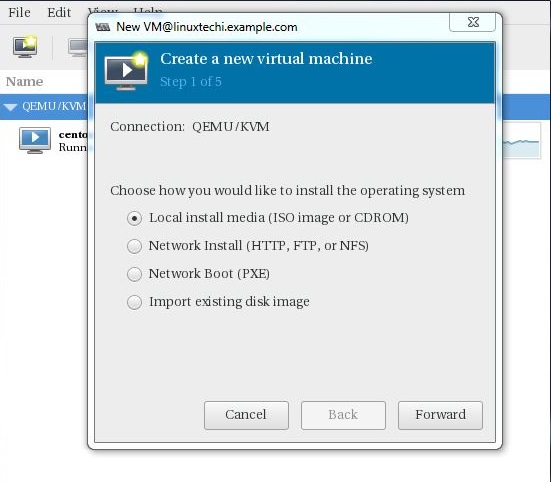
Start creating virtual machine using by ‘virt-install’ or virt-manager [GUI Tool]
Go to file option, Click on “New Virtual Machine”

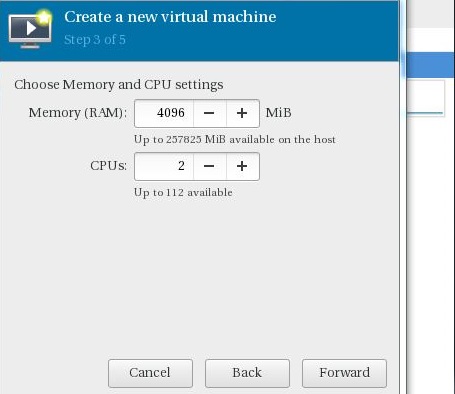
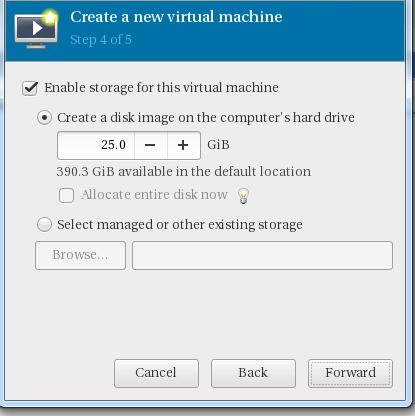
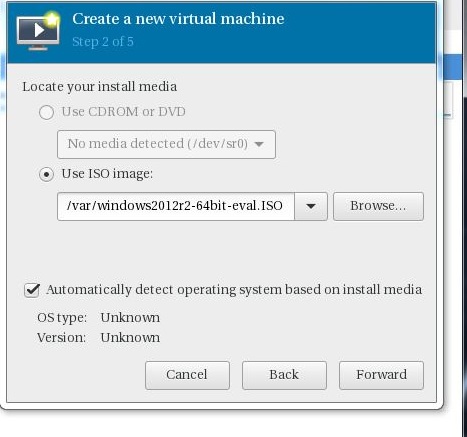
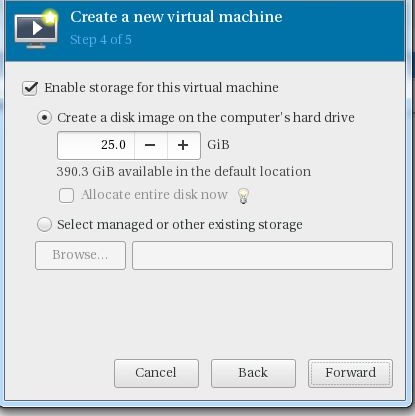
Specify ISO file location and provide RAM and CPU as per your requirement. 
Click on Finish to create Virtual Machine

Creating a virtual Machine from Command Line:

[root@localhost ~] # virt-install –name=Ubuntu-16-04 –file=/var/lib/libvirt/images/ubuntu16-04.dsk –file-size=20 –nonsparse –graphics spice –vcpus=2 –ram=2048 –cdrom=ubuntu-16.04-server-amd64.iso –network bridge=br0 –os-type=linux –os-variant=generic
Starting install…
Allocating ‘ubuntu16-04.dsk’               | 20 GB 00:00:00
Creating domain…

Install KVM Virtualization on Centos 7 and RHEL 7

Description: KVM is an open source hardware virtualization software through which we can create and run multiple Linux based and windows based virtual machines simultaneously. KVM known as Kernel based Virtual Machine because when we install KVM package then KVM module is loaded into the current kernel and turns our Linux machine into a hyper-visor.
Before installation, we need to check CPU supports Hardware Virtualization. To check use below command:
[root@localhost ~] # grep -E ‘(vmx|svm)’ /proc/cpuinfo
Output should be either vmx or svm, Otherwise CPU does not support Virtualization
Procedure:
First install KVM and its associate packages 
[root@localhost ~] # yum install qemu-kvm qemu-img virt-manager libvirt libvirt-python libvirt-client virt-install virt-viewer bridge-utils
After installation enable and start libvirtd service
[root@localhost ~] # systemctl start libvirtd
[root@localhost ~] # systemctl enable libvirtd 
Verify KVM Installation:
[root@localhost ~] # lsmod | grep -i kvm
kvm_intel             162153  0
kvm                   525409  1 kvm_intel
Configure Bridge Interface: Before start creating VM you need to configure bridge interface is required if you want to access virtual machine from outside of your network
[root@localhost ~]# cd /etc/sysconfig/network-scripts/
[root@localhost network-scripts]# cp ifcfg-eth0 ifcfg-br0
Edit the Interface file and set followings:
[root@localhost network-scripts]# vi ifcfg-eth0
TYPE=Ethernet
BOOTPROTO=static
DEVICE=eth0
ONBOOT=yes
BRIDGE=br0
Edit the Bridge file (ifcfg-br0) and set the followings:

[root@localhost network-scripts] # vi ifcfg-br0
TYPE=Bridge
BOOTPROTO=static
DEVICE=br0
ONBOOT=yes
IPADDR=10.10.10.1
NETMASK=255.255.255.0
GATEWAY=10.10.10.11
DNS1=10.10.10.11
Replace the IP address and DNS server details as per your setup.
After making changes Restart network service 
[root@localhost ~] # systemctl restart network
Check the Bridge interface using below command :
[root@localhost ~] # ip addr show br0
Start creating virtual machine using by ‘virt-install’ or virt-manager [GUI Tool]
Go to file option, Click on “New Virtual Machine”

Specify ISO file location and provide RAM and CPU as per your requirement. 
Click on Finish to create Virtual Machine

Creating a virtual Machine from Command Line:

[root@localhost ~] # virt-install –name=Ubuntu-16-04 –file=/var/lib/libvirt/images/ubuntu16-04.dsk –file-size=20 –nonsparse –graphics spice –vcpus=2 –ram=2048 –cdrom=ubuntu-16.04-server-amd64.iso –network bridge=br0 –os-type=linux –os-variant=generic
Starting install…
Allocating ‘ubuntu16-04.dsk’               | 20 GB 00:00:00
Creating domain…

SSL Certificate Installation – Tomcat Server

Procedure:


Create a New Keystore:

  • You will be using the keytool command to create and manage your new Keystore file. You may need to add the java /bin/ directory to your PATH before the keytool command is recognized. When you are ready to create your keystore go to the directory where you plan to manage your Keystore and certificates. Enter the following command in command prompt:

           keytool -genkey -alias server -keyalg RSA -keysize 2048 -keystore your_site_name.jks

  • You will be prompt to choose a password for your keystore. You will then be prompt to enter your Organization information.
  • When it asks for first and last name, this is NOT your first and last name, but rather it is your Fully Qualified Domain Name for the site you are securing (example: http://www.yourdomain.com). If you are ordering a Wildcard Certificate this must begin with the * character. (example: *.yourdomain.com)
  • After you have completed the required information, confirm that the information is correct by entering ‘y’ or ‘yes’ when prompted. Next, you will be ask for your password to confirm. Make sure to remember the password you choose. Your keystore file named your_site_name.jks is now create in your current working directory.

Generate a CSR from Your New Keystore:

  • Next, you will use keytool to create the Certificate Signing Request (CSR) from your Keystore. Enter the following command:

         keytool -certreq -alias server -file csr.txt -keystore your_site_name.jks

  • Type the keystore password that you chose earlier and hit Enter.
  • Once CSR generated upload it to Certificate Authority and generate SSL certificate.
  • Install Certificate on Tomcat Server
  • Depending on the certificate format in which you received the certificate from the Certificate Authority, there are different ways of importing the files into the keystore. 
PKCS#:   
  • If the certificate you received is in PKCS#7 format (the extension of the certificate file will be .p7b or .cer), it already includes the necessary intermediate and root certificates. Additionally, a certificate with .p7b extension can be download in the user account. Run the following command to import it into the keystore:

         keytool -import -trustcacerts -alias server -keystore example.jks -file example.p7b

  • If the certificate was imported successfully, you will see the message ‘Certificate reply was installed in keystore’. You can check the details of the certificate that was imported to the keystore with a command:
         keytool -list -keystore example.jks 

PEM: 
  • If you received the certificate in the PEM format ( files will be with the .crt extension), you will need to import the root certificate, intermediate certificates and the certificate issued for your domain name to the keystore separately starting from a root certificate and ending with the certificate for your domain name. To import a root certificate, run the following command

        keytool -import -alias root -keystore example.jks -trustcacerts -file root.crt

  • To import an intermediate certificate

        keytool -import -alias intermediate -keystore example.jks -trustcacerts -file intermediate.crt

  • After the successful import you need to edit Tomcat configuration file. As a rule, it is called server.xml and usually can be found in Home_Directory/conf folder. Please change in configuration file as follow:

        <Connector port="443" protocol="HTTP/1.1"

          SSLEnabled=”true”
          scheme=”https” secure=”true” clientAuth=”false”
          sslProtocol=”TLS” keystoreFile=”/your_path/yourkeystore.jks”
          keystorePass=”password_for_your_key_store” />

  • Save the changes and restart Tomcat web service.

SSRS: Error: The user or group name ‘Domain\SomeUser’ is not recognized

Description: When you install SSRS after restore backup it shows error like as follow:
An error occurred while adding users ‘Domain\SomeUser’,’Domain\SomeUser2′ to the SQL Server Reporting Services DynamicsAXBrowser role in the folder DynamicsAX. The error is: The user or group name ‘Domain\SomeUser’ is not recognized.

Solution: Remove entry of previous SSRS server from SysServerSessions table and then restart AOS service.

Email Best Practices: Setup SPF, DKIM and DMARC in Zimbra Mail Server

Description:  To protect mail server against spoofing and mails not delivered in Junk folder in other platforms like Google Apps, Yahoo, and Outlook etc. We need to setup SPF, DKIM and DMARC in Mail server. Please find the below detail information about SPF, DKIM and DMAC as follow:

1. SPFSender Policy Framework (SPF) is an email validation system, designed to prevent unwanted emails using a spoofing system. To check this common security problem, SPF going to verify the source IP of the email and compare it with a DNS txt record with a SPF content.

  • Mechanisms can be prefixed with one of four qualifiers:
          “+”   Pass
          “-”    Fail
          “~”   SoftFail
          “?”   Neutral
  • If a mechanism results in a hit, its qualifier value is used. The default qualifier is “+”, i.e. “Pass”. For example:
“v=spf1 -all”
“v=spf1 a -all”
“v=spf1 a mx -all”
“v=spf1 +a +mx -all”
“v=spf1 include: yourdomain.net ~all”
2. DKIM [Domain Key Identified Mail]: DKIM is method to associate the domain and the email, allowing to person or company assume the responsibility of the email.
Please generate DKIM key in Zimbra Mail Server using SSH:
 # /opt/zimbra/libexec/zmdkimkeyutil -a -d yourdomain.com
You will receive output as follow:
DKIM Data added to LDAP for domain zimbra.io with selector 25D766CE-CEAC-11E7-B087-020B6DB9DD9A
Public signature to enter into DNS:
25D766CE-CEAC-11E7-B087-020B6DB9DD9A._domainkey IN      TXT     ( “v=DKIM1; k=rsa; “
          “p=MIIBIjANBgkqhkiG9w0BAQEFAAOCAQ8AMIIBCgKCAQEAwA4vVMiV3/14hRMzbKNnBKNThqxTWLi2E5NqqHLccIJg/P33yqwgGVKKUM9HFfXZ8urz6/dl8oNG3oxs73W1sgWHrFRo3ZayHsuUMe+DLyt8wtyR/RUae0nvd6Z6t0lPwujXWBrRS/FeMg/IGA8ExBKjD+aAYdQfH/lhlDGzumTXgbSB0KMzlpOjcum2Aes69rEiR744GGaPb2”
          “X3MxK8vjpeMIx16n2tADb0wKKP19WTF0at5HCP8F4SFflLUPJMOC1Be9FCWjTjNr1qrRZTwCwC7OC9tnV7SsKKXG+8D6hu39Tm5U1GLzpKvLMIv14b6MWsU9cV/iVKH+hQq4YRowIDAQAB” )  ; —– DKIM key 25D766CE-CEAC-11E7-B087-020B6DB9DD9A for zimbra.io

After generate DKIM test key using below site:
Selector: 25D766CE-CEAC-11E7-B087-020B6DB9DD9A
Domain:  yourdomain.com
Key: “p=MIGfMA0GCSqGSIb3DQEBAQUAA4GNADCBiQKBgQD4sp8nBr2CqtNJJVYJte+TaX5E4rrRPB2P
ICp/AnkaTsA6J7NADJz21JA+supRZ1VzaGVuHL2vKzTFM7YjR/9pdSNuCLTzpAr3uuqzwna89G
eb5kcz4ICzLt5XoxfEmEtnAz43DidZ/JXDOD/iRprPl+B9k15XHbPVjatmuLReSQIDAQAB”
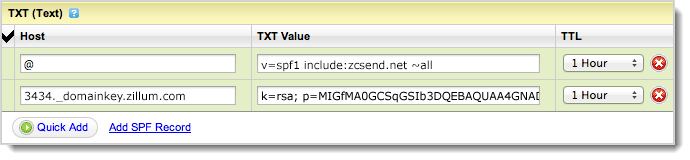
Add DKIM and SPF in DNS as following screen shot:
3. DMARC: Domain-based Message Authentication, Reporting & Conformance (DMARC) is a technical specification created by a group of organizations that want to help reduce the potential for email-based abuse by solving a couple of long-standing operational, deployment, and reporting issues related to email authentication protocols. 
DMARC standardizes how email receivers perform email authentication using the well-known SPF and DKIM mechanisms. This means that senders will experience consistent authentication results for their messages at AOL, Gmail, Hotmail, Yahoo! and any other email receiver implementing DMARC. We hope this will encourage senders to more broadly authenticate their outbound email which can make email a more reliable way to communicate. 
Add DMARC record as follow:
Type: TXT
Host/Name: _DMARC.yourdomain.com
Value: v=DMARC1; p=none; rua=mailto:spam-reports@yourdomain.com; ruf=mailto:spam-reports@yourdomain.com

Migrate Emails from Gmail to Zimbra

Description: Here I have explained how to migrate emails from google apps account to zimbra server. For migration I have used imapsync utility.

  • Install imapsync in destination Zimbra server using yum 

          # yum install imapsync

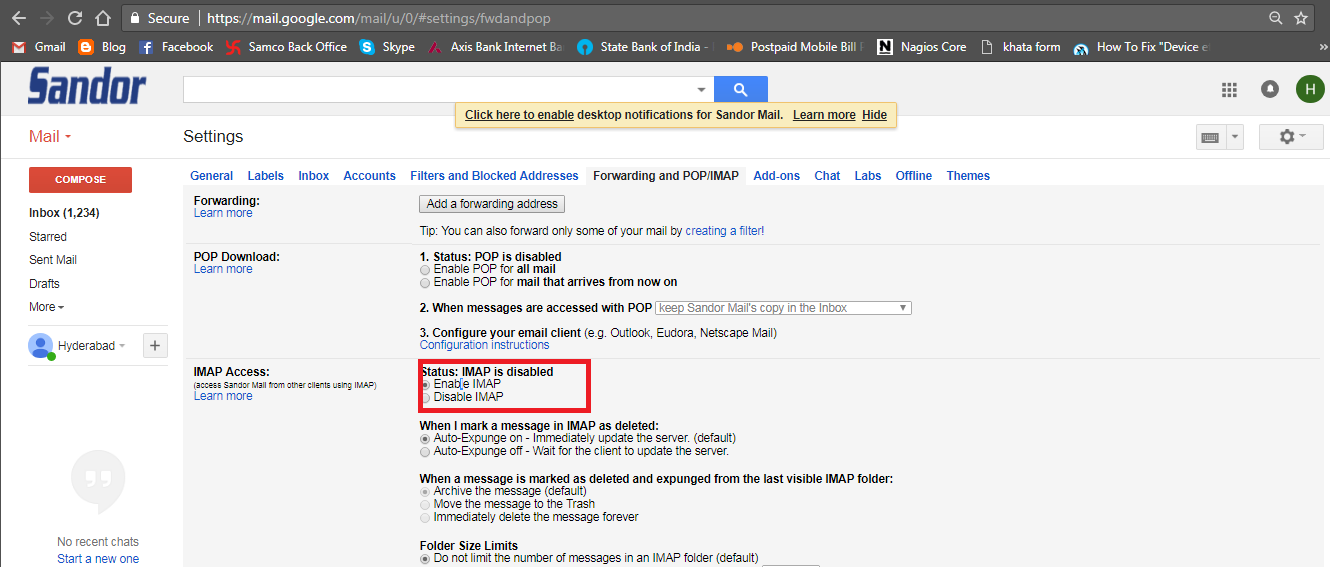
  • Login user in gmail and allow Imap from account settings as follow:
  • Create Email Account in Zimbra Mail Server
  • Run below command in zimbra as root:

   # imapsync –host1 74.125.133.108 –user1 user@googleaccount.co.in –password1 password –host2 hostname.zimbradomain.com –user2 user@zimbradomain.com –password2 password –syncinternaldates –ssl1 -ssl2 –noauthmd5  –exclude All Mail –useheader ‘Message-ID’

Mass email migration from Google Apps to using imapsync
  • ·         Create one user.txt file which contains source and destination users and their passwords like as follow:
          user1@source.tld;user1sourcepassword;user1@destination.tld;user1destinationpassword
          user2@source.tld;user2sourcepassword;user2@destination.tld;user2destinationpassword
          user3@source.tld;user3sourcepassword;user3@destination.tld;user3destinationpassword
  • ·         Create shell script in same location and paste below content in it.
#!/bin/bash
#Configure servers
SERVER1= imap.gmail.com
SERVER2=imap.destination.com
#Uncomment to hide folder sizes
#FAST=”–nofoldersizes”
#Uncomment to do a dry run (no actual changes)
#DRY=”–dry”
#Uncomment to just sync folders (no messages)
#JUSTFOLDERS=”–justfolders”
#Uncomment to just connect (no syncs at all)
#JUSTCONNECT=”–justconnect”
#Set the path to your imapsync binary
imapsync=imapsync
#Users file
if [ -z “$1” ]
then
echo “No users text file given.”
exit
fi
if [ ! -f “$1” ]
then
echo “Given users text file \”$1\” does not exist”
exit
fi
{ while IFS=’;’ read  u1 p1 u2 p2; do
$imapsync –usecache –tmpdir /var/tmp \
–host1 ${SERVER1} –user1 “$u1” \
–password1 “$p1” –ssl1 \
–host2 ${SERVER2} \
–port2 993 –user2 “$u2” \
–password2 “$p2” –ssl2 \
${FAST} ${DRY} ${JUSTFOLDERS} ${JUSTCONNECT} \
–regextrans2 ‘s{Sent$}{[Gmail]/Sent Mail}’ \
–regextrans2 ‘s{Sent Items$}{[Gmail]/Sent Mail}’ \
–regextrans2 ‘s{Sent Messages$}{[Gmail]/Sent Mail}’ \
–regextrans2 ‘s{Drafts$}{[Gmail]/Drafts}’ \
–exclude ‘INBOX.Trash|INBOX.spam|INBOX.Apple Mail To Do’
done ; } < $1
Note:  Change as Source and Destination server.
  • ·         Run script using below comman

          ./migration.sh users.txt

  • ·         The script can take a long time to run, so I suggest using nohup and redirecting the output to a log file:

          nohup ./migration.sh users.txt > migrationlog.txt 2>&1 &

Change IP Address Of Zimbra Mail Server

How to Change IP Address Of Zimbra Mail Server:

  •  Check current IP address configuration in postconf

[root@mail /]# su zimbra

[zimbra@mail /]$ postconf mynetworks
mynetworks = 127.0.0.0/8 192.168.1.0/24 [::1]/128 [fe80::]/64
[zimbra@mail /]$
  • In this case our postfix will reply for all machines with 192.168.1.X serious all IP address
  • Change or Modify IP address using below:
[zimbra@mail /]$ hostname
mail.server.local
[zimbra@mail /]$ zmprov ms mail.server.local zimbraMtaMyNetworks ‘127.0.0.1/8 192.168.1.200/24’
[zimbra@mail /]$ postfix reload
  •  Verify configuration after changes

[zimbra@mail /]$ postconf mynetworks

mynetworks = 127.0.0.1/8 192.168.1.200/24