Share Point Database Details and Upgrade Share Point 2010 to 2013

Description: Here I have explained Share Point database details and how to upgrade Share Point from 2010 to 2013
Share Point Databases:
·         1 Database for SharePoint Configuration (SharePoint_Config_{Guid})
·         1 Database for SharePoint Central Administration (SharePoint_AdminContent_{Guid})
·         If you have 3 web applications, you will have minimum 3 SharePoint Content Databases. Each will have 1 SharePoint Content Database.
·         The Content database was named like WSS_Content_{GUID of webapplication}
SharePoint upgradation process from 2010 to 2013:
1>     Set up Server 2012 Server and a SharePoint 2013 Farm in Target server
          Set up Server 2012 and install SharePoint 2013 on the target server and configure a SharePoint 2013 farm. When you create your Web application and site collection, make sure that you create the same type of site, the same port and the same authentication method as the source site.
2>     Copy the SharePoint 2010 Database to the Target Server
          Before proceeding, please make a backup of your Source Server’s SharePoint application.
          Next, open SharePoint Central Administration on the source server and navigate to Application Management > Manage Content Databases. Locate the database pertaining to your Web application.
          Copy database [wss_content_database] or relevant SharePoint database to new database server.
          Check db_owner privilege must be assigned to user.
          From SharePoint 2013 [Target server] management shell run below command
Mount-SPContentDatabase -Name WSS_Content -WebApplication http://taurus/
3>     Verify site after migration
          Enter your site and verify that it’s working. You may notice that it still looks like SharePoint 2012. That’s because we have not yet upgraded the site collection.
          Once you verify that the site is working, go to Central Administration > Application Management > Configure Alternate Access Mappings and change the default URL to the live URL of your Web site; alternatively, you can extend your Web site.
          Once you make the port forwarding and/or DNS changes (if necessary), your newly migrated site will be live!
4>     Upgrade the Site Collection
          The final step is to upgrade the site collection. Before proceeding with the site collection upgrade, create a backup or a snapshot of the SharePoint 2013 server in case the fecal matter impacts the therm antidote.
          From the Web site, click site actions > site settings. In the site collection administration menu, click on the site collection upgrade link.

Copy or Migrate Database from one MSSQL to Another

Description:  There are two methods to copy or migrate database from one machine to another
Method-1: Backup database and Restore it to another:
      ·         Open SQL Management Studio
      ·         Choose your database
      ·         Right Click, go to Tasks —> Backup
      ·         In the database backup windows, click add and then give backup path and file name and click ok
      ·         Copy backup file to destination machine
      ·         Open SQL Management studio on destination machine
      ·         Create new database
      ·         Right click on newly created database, go to Tasks —> Restore–> Database
      ·         on the restore window select from device option
      ·         Add backup file path
      ·         Click Ok
Method-2: Copy .mdf and .ldf file from source machine to destination machine. You need to take database offline to copy .mdf and .ldf file of database
      ·         You need to take database offline. For offline choose database
      ·         Right Click, go to Tasks —> Take Offline
      ·         Copy database and log file from database directory and paste it to destination machine in  database directory
      ·         On Destination machine, Open SQL Management studio
      ·         Right Click on Databases, go to Attach
      ·         Click on Add button and select database file that you have copied
      ·         Don’t forget to online database in source machine

Backup configuration using maintenance plan in SQL management studio

Add caption

Maintenance Plan in MSSQL Server

Description: Maintenance plan use to configure backup in MSSQL Server. This feature is only available in MSSQL Standard and Enterprise Edition. In this example the maintenance plan with full daily backup and cleanup after 2 working copy of database.
Procedure: Please find below steps to configure backup maintenance plan in MSSQL Server
      ·         Check SQL Agent Service is running and set automatic from services.msc. The maintenance plan is depend on this service.
      ·         Open SQL Management studio for create maintenance plan.
      ·         In the Object Explorer pane, expand the Management folder, right-click on Maintenance Plans, and the select Maintenance Plan Wizard.


              ·    On the welcome page of the wizard, click next.
        ·    Fill all details of as define in wizard

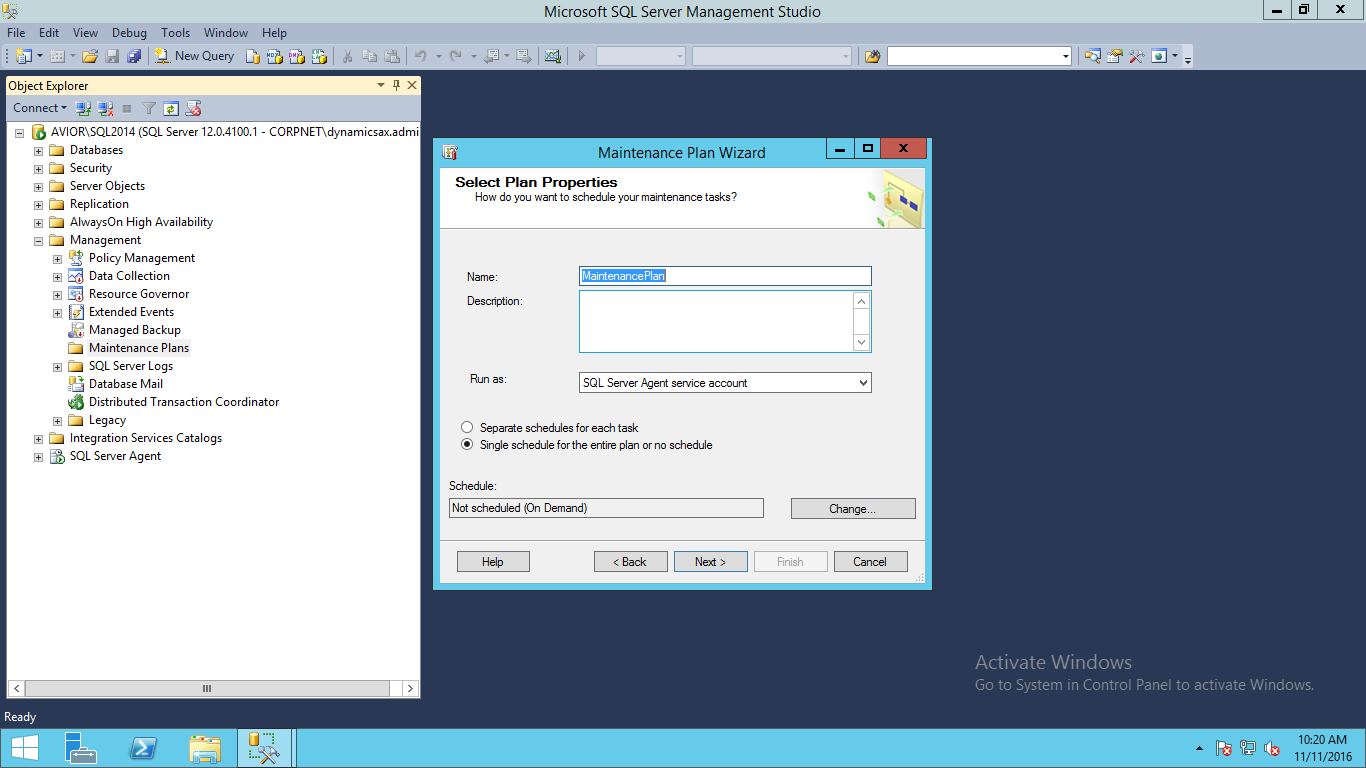
    ·    Name: As you want to display in management studio under plan

    ·    Schedule:Define Schedule to run this plan as defined in below image:

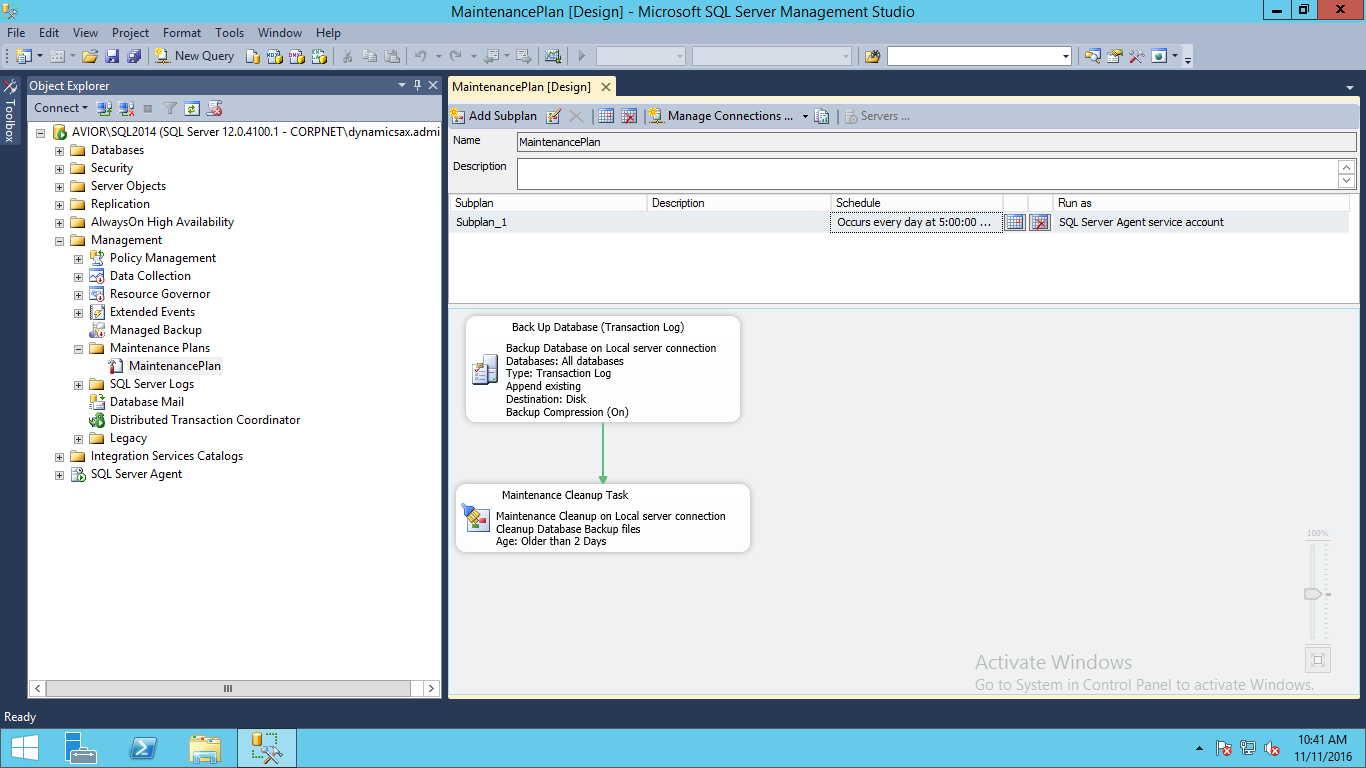
·    In this example we have define daily backup at 5:00 AM

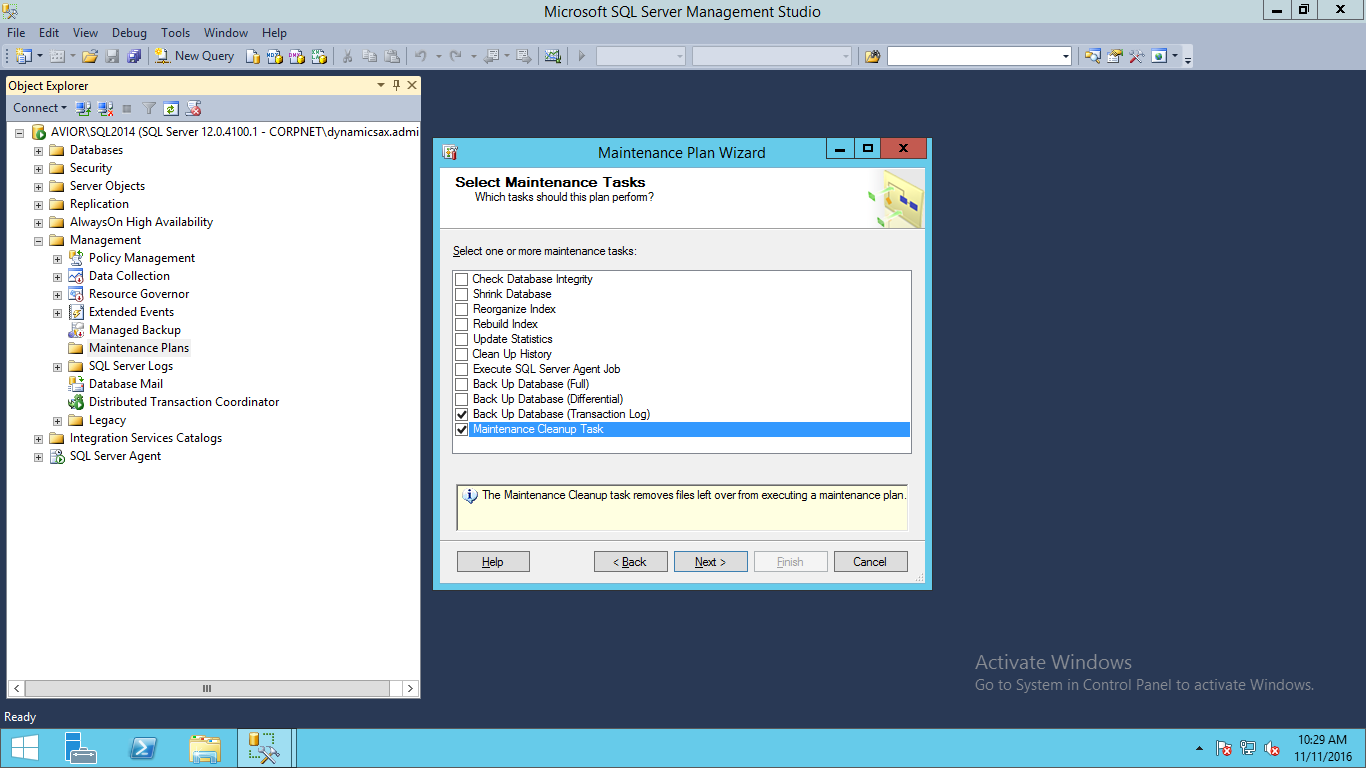
      ·   On Select maintenance page filled tasks that you want to perform.

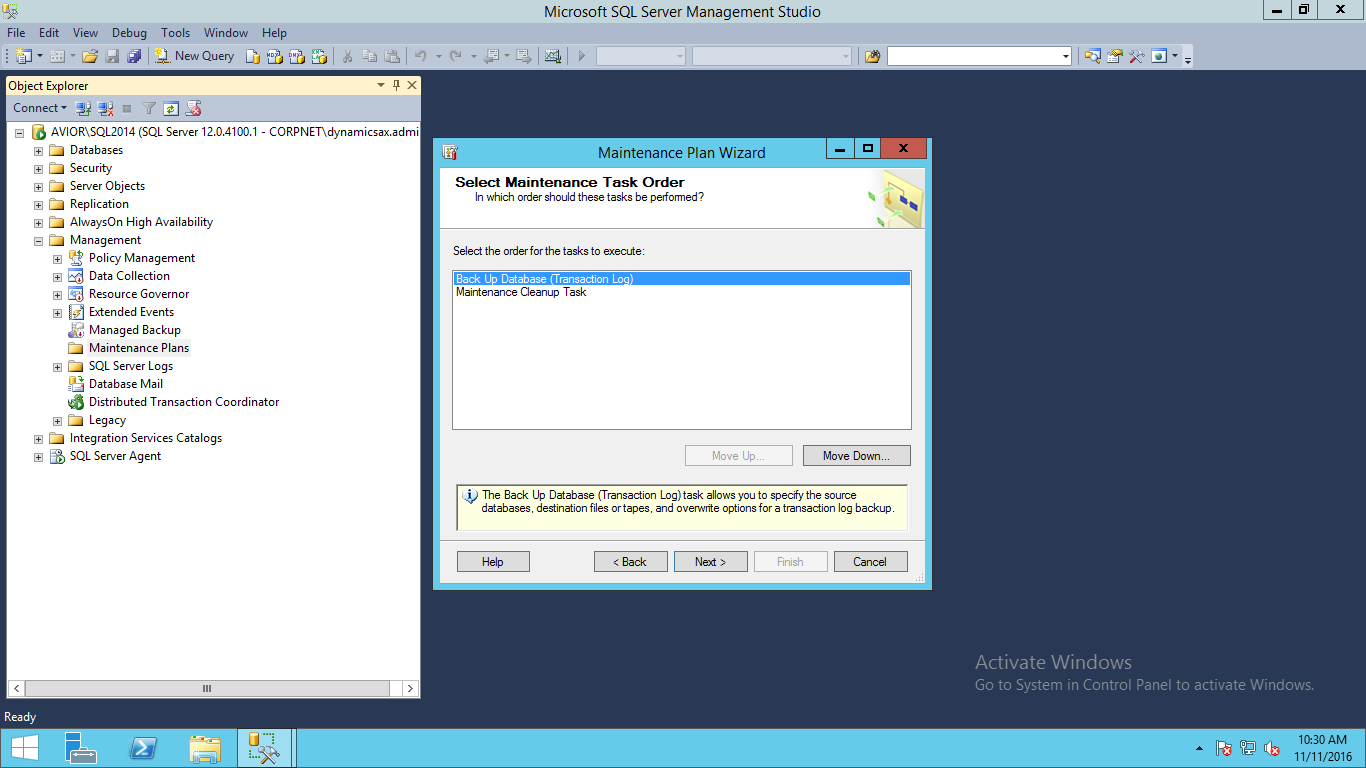
     ·         On Select maintenance task order set order to run or perform tasks

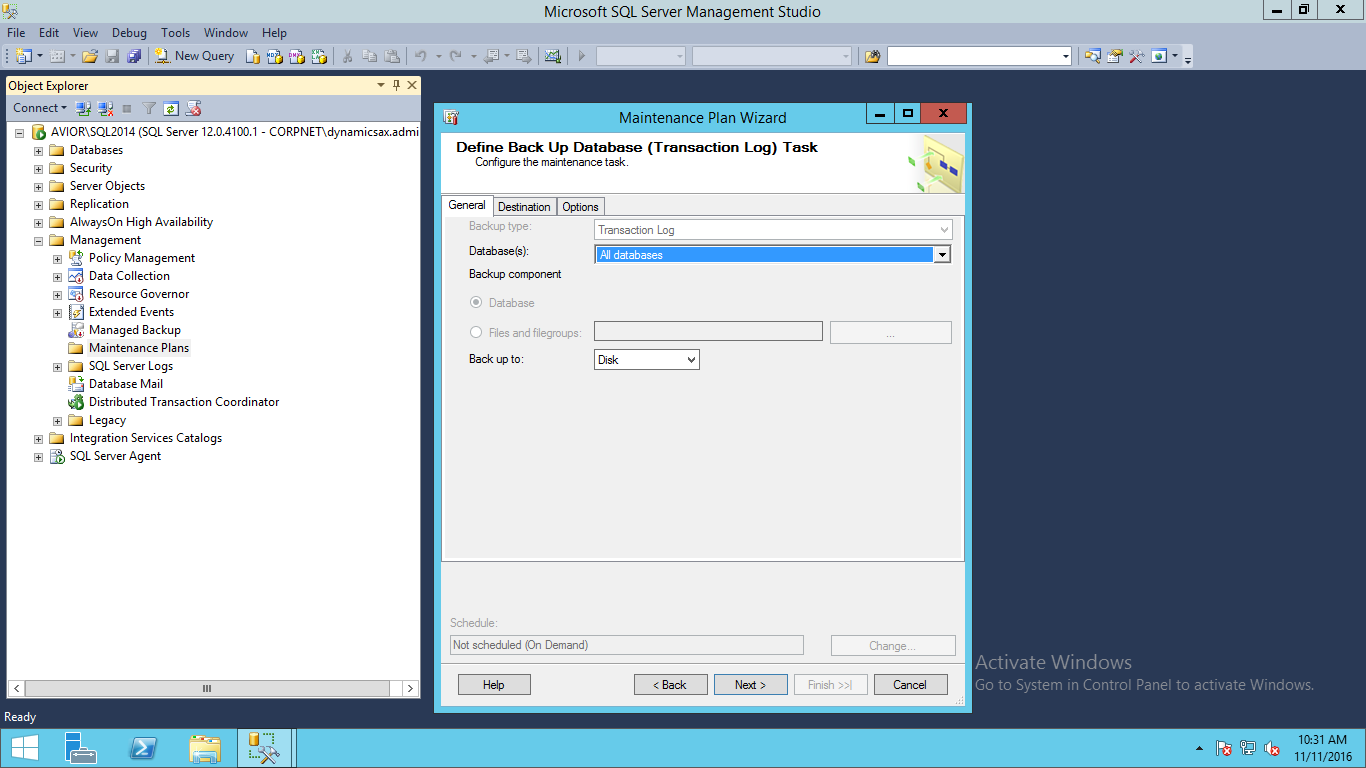
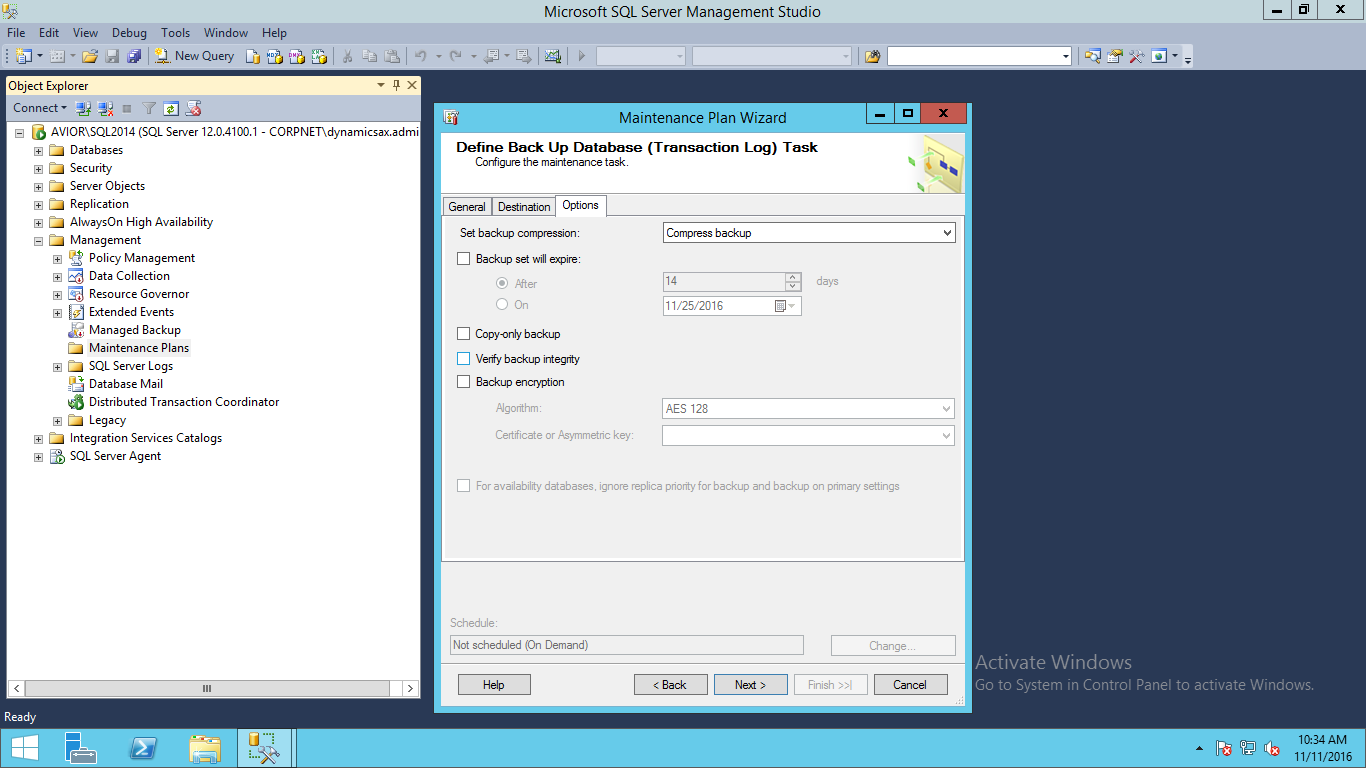
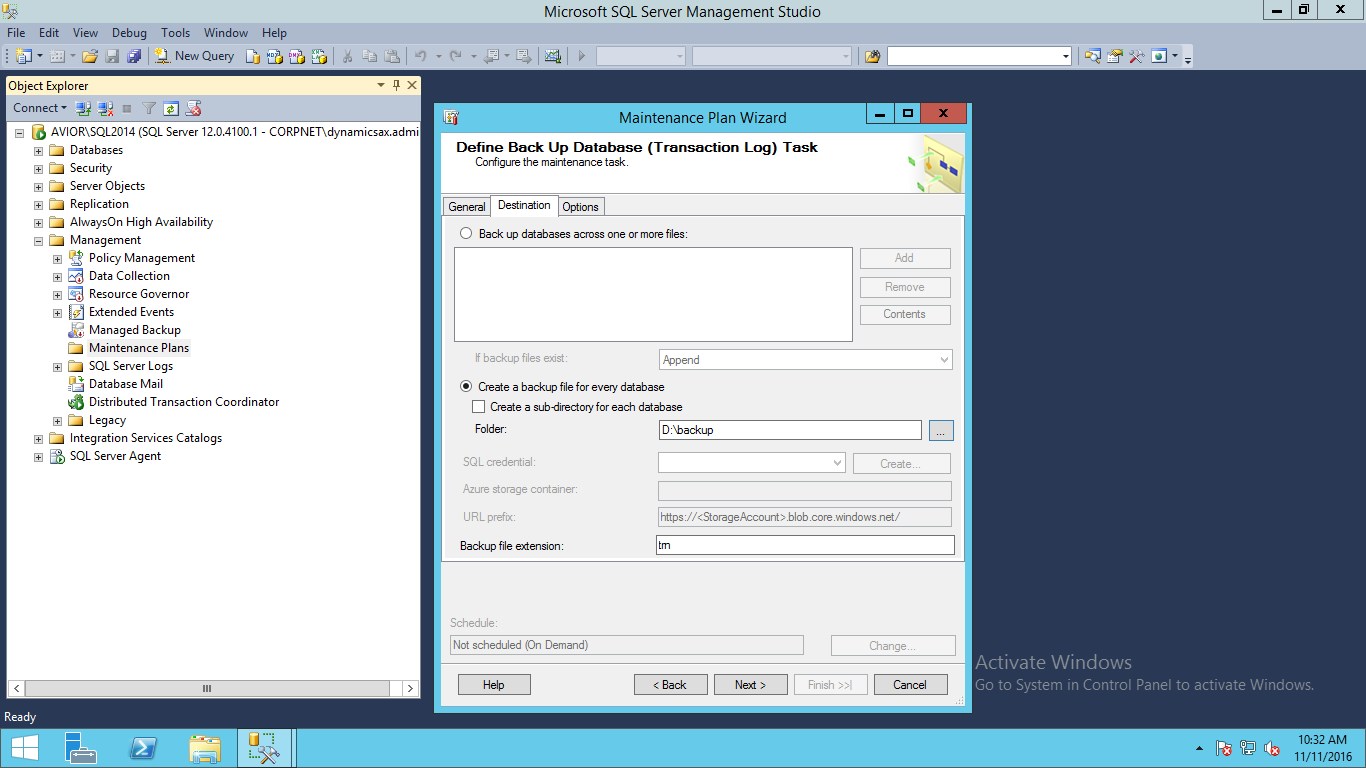
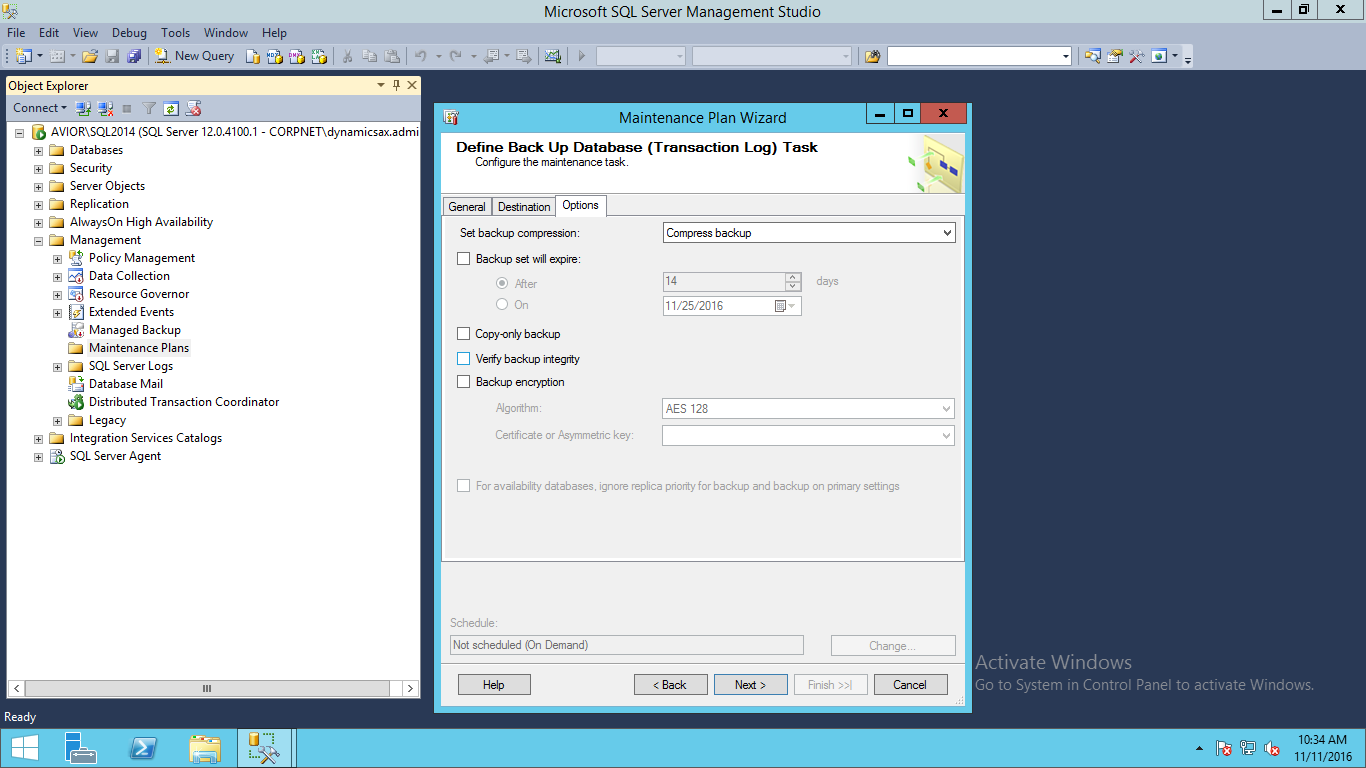
     ·         Define backup database fill required information  as follow:

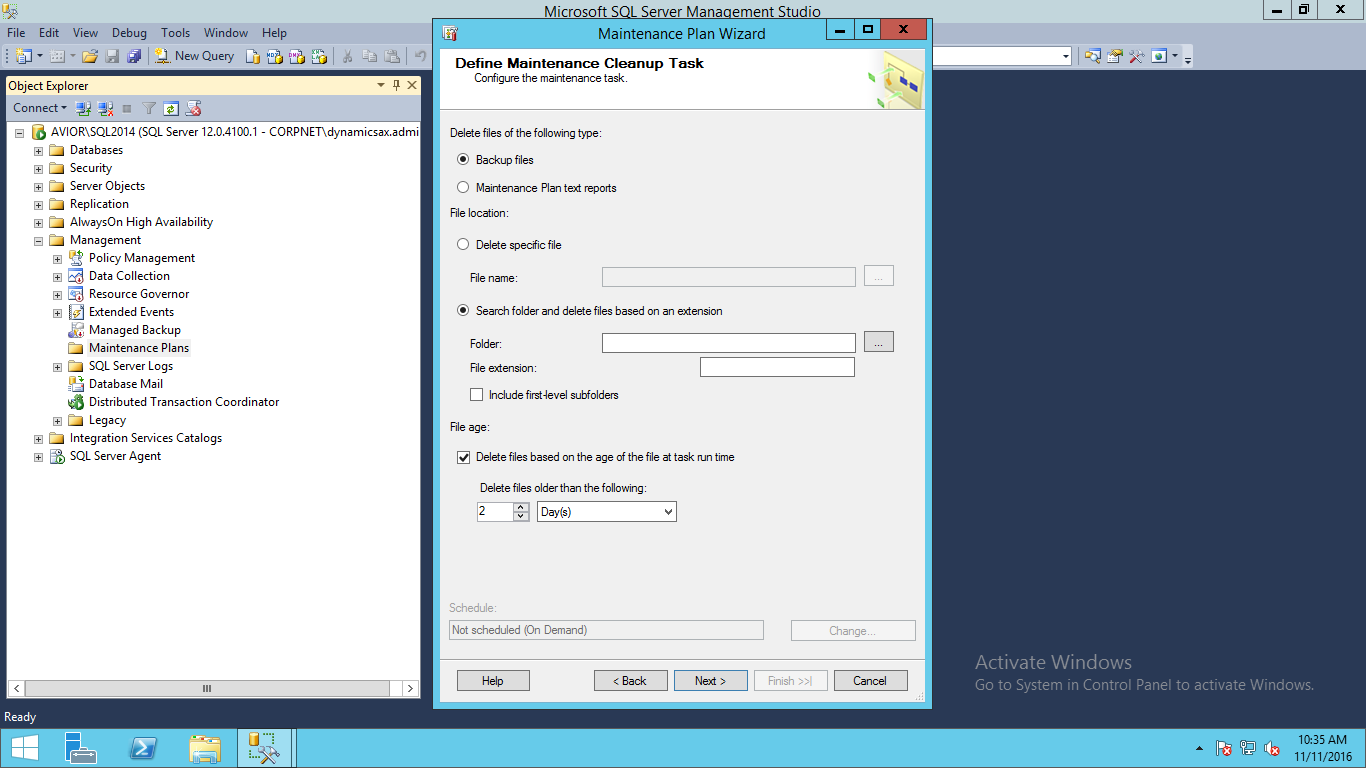
         ·         Define maintenance plan as you want to keep 2 copy of database define in cleanup task.

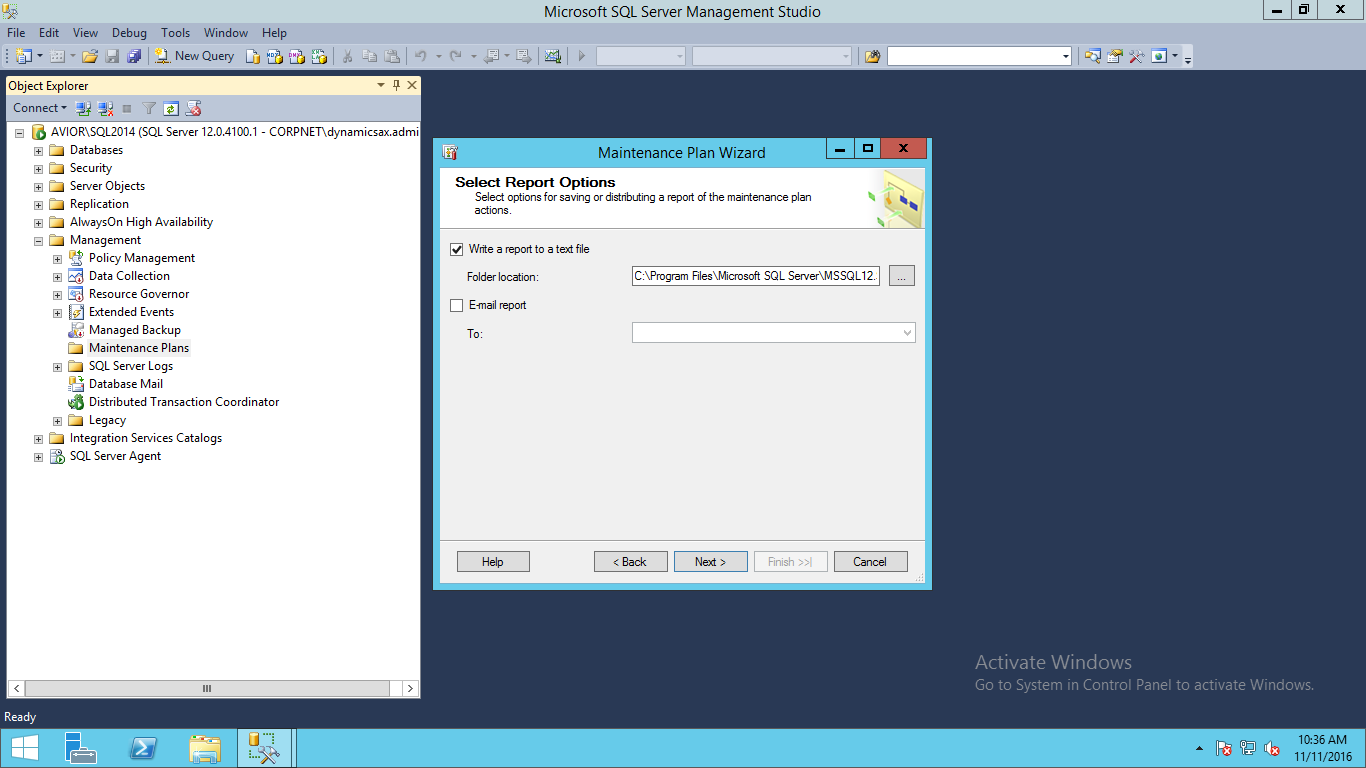
          ·   Select Report Option: If you want to save report in text file or mail it to any mail id then you can set
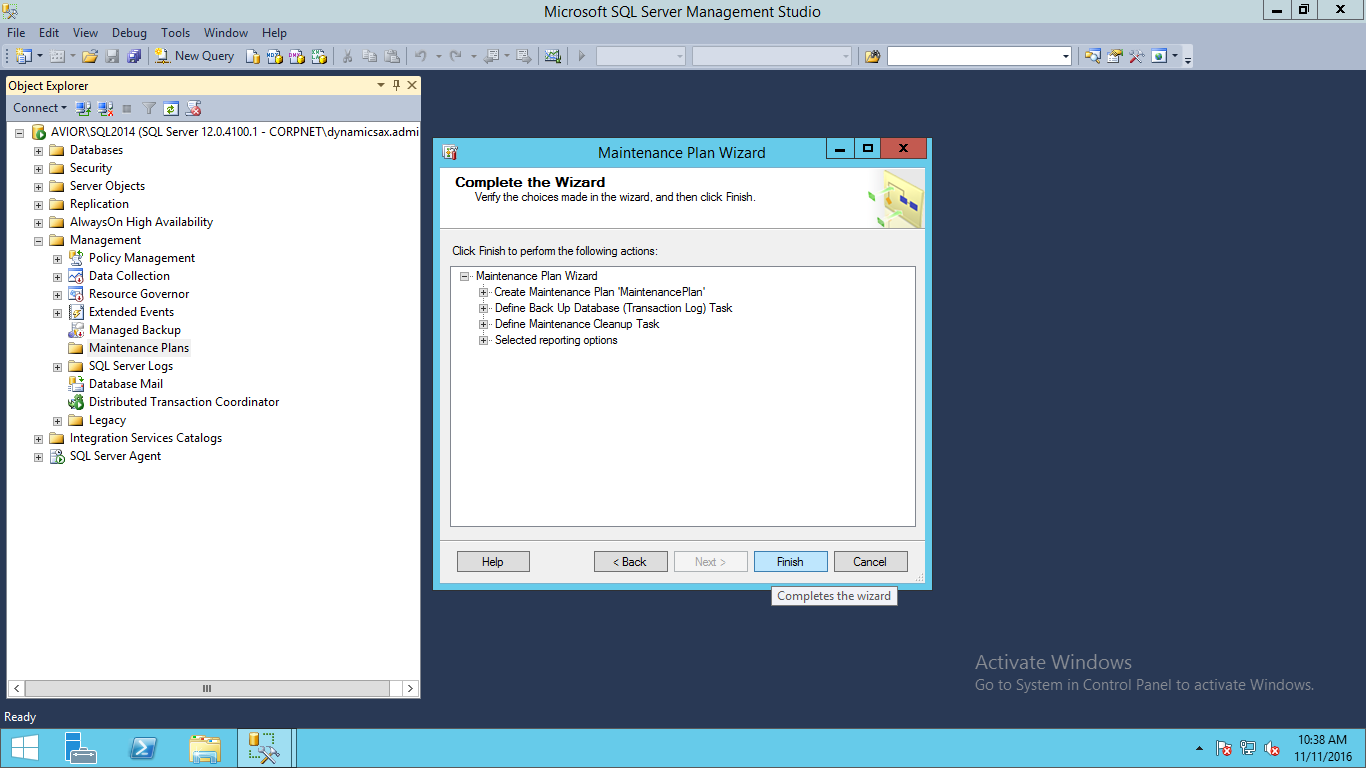
          ·   Complete the wizard

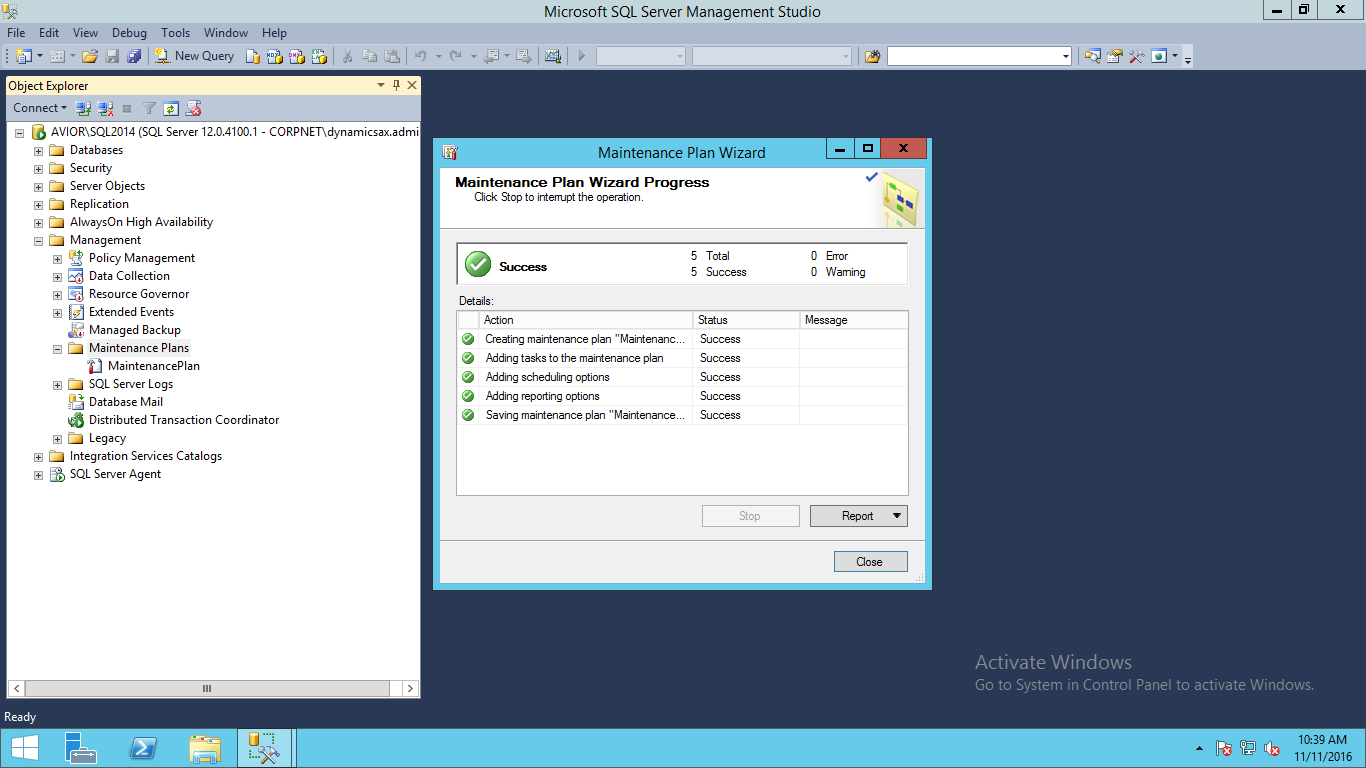
        ·         Plan wizard final output.

         ·         You can fine maintenance plan in management status.

          ·         Check  maintenance plan as follow:

Backup of MSSQL Database in Express Edition

Backup of databases in SQL_EXPRESS Edition

As we all know there is no inbuild functionality for backup in like available in standard and Enterprise Edition. Please find some different methods for Backup

Method-1
     1>  Create one stored procedure using below query  that use to take backup
[Stored Procedure Name =sp_BackupDatabases]
USE [master]
GO
/****** Object:  StoredProcedure [dbo].[sp_BackupDatabases] ******/
SET ANSI_NULLS ON
GO
SET QUOTED_IDENTIFIER ON
GO
— =============================================
— Description: Backup Databases for SQLExpress
— Parameter1: databaseName
— Parameter2: backupType F=full, D=differential, L=log
— Parameter3: backup file location
— =============================================
CREATE PROCEDURE [dbo].[sp_BackupDatabases] 
            @databaseName sysname = null,
            @backupType CHAR(1),
            @backupLocation nvarchar(200)
AS
       SET NOCOUNT ON;
          
            DECLARE @DBs TABLE
            (
                  ID int IDENTITY PRIMARY KEY,
                  DBNAME nvarchar(500)
            )
          
             — Pick out only databases which are online in case ALL databases are chosen to be backed up
             — If specific database is chosen to be backed up only pick that out from @DBs
            INSERT INTO @DBs (DBNAME)
            SELECT Name FROM master.sys.databases
            where state=0
            AND name=@DatabaseName
            OR @DatabaseName IS NULL
            ORDER BY Name
          
            — Filter out databases which do not need to backed up
            IF @backupType=’F’
                  BEGIN
                  DELETE @DBs where DBNAME IN (‘tempdb’,’Northwind’,’pubs’,’AdventureWorks’)
                  END
            ELSE IF @backupType=’D’
                  BEGIN
                  DELETE @DBs where DBNAME IN (‘tempdb’,’Northwind’,’pubs’,’master’,’AdventureWorks’)
                  END
            ELSE IF @backupType=’L’
                  BEGIN
                  DELETE @DBs where DBNAME IN (‘tempdb’,’Northwind’,’pubs’,’master’,’AdventureWorks’)
                  END
            ELSE
                  BEGIN
                  RETURN
                  END
          
            — Declare variables
            DECLARE @BackupName varchar(100)
            DECLARE @BackupFile varchar(100)
            DECLARE @DBNAME varchar(300)
            DECLARE @sqlCommand NVARCHAR(1000)
        DECLARE @dateTime NVARCHAR(20)
            DECLARE @Loop int                 
                      
            — Loop through the databases one by one
            SELECT @Loop = min(ID) FROM @DBs
      WHILE @Loop IS NOT NULL
      BEGIN
— Database Names have to be in [dbname] format since some have – or _ in their name
      SET @DBNAME = ‘[‘+(SELECT DBNAME FROM @DBs WHERE ID = @Loop)+’]’
— Set the current date and time n yyyyhhmmss format
      SET @dateTime = REPLACE(CONVERT(VARCHAR, GETDATE(),101),’/’,”) + ‘_’ +  REPLACE(CONVERT(VARCHAR, GETDATE(),108),’:’,”) 
— Create backup filename in path\filename.extension format for full,diff and log backups
      IF @backupType = ‘F’
            SET @BackupFile = @backupLocation+REPLACE(REPLACE(@DBNAME, ‘[‘,”),’]’,”)+ ‘_FULL_’+ @dateTime+ ‘.BAK’
      ELSE IF @backupType = ‘D’
            SET @BackupFile = @backupLocation+REPLACE(REPLACE(@DBNAME, ‘[‘,”),’]’,”)+ ‘_DIFF_’+ @dateTime+ ‘.BAK’
      ELSE IF @backupType = ‘L’
            SET @BackupFile = @backupLocation+REPLACE(REPLACE(@DBNAME, ‘[‘,”),’]’,”)+ ‘_LOG_’+ @dateTime+ ‘.TRN’
— Provide the backup a name for storing in the media
      IF @backupType = ‘F’
            SET @BackupName = REPLACE(REPLACE(@DBNAME,'[‘,”),’]’,”) +’ full backup for ‘+ @dateTime
      IF @backupType = ‘D’
            SET @BackupName = REPLACE(REPLACE(@DBNAME,'[‘,”),’]’,”) +’ differential backup for ‘+ @dateTime
      IF @backupType = ‘L’
            SET @BackupName = REPLACE(REPLACE(@DBNAME,'[‘,”),’]’,”) +’ log backup for ‘+ @dateTime
— Generate the dynamic SQL command to be executed
       IF @backupType = ‘F’
                  BEGIN
               SET @sqlCommand = ‘BACKUP DATABASE ‘ +@DBNAME+  ‘ TO DISK = ”’+@BackupFile+ ”’ WITH INIT, NAME= ”’ +@BackupName+”’, NOSKIP, NOFORMAT’
                  END
       IF @backupType = ‘D’
                  BEGIN
               SET @sqlCommand = ‘BACKUP DATABASE ‘ +@DBNAME+  ‘ TO DISK = ”’+@BackupFile+ ”’ WITH DIFFERENTIAL, INIT, NAME= ”’ +@BackupName+”’, NOSKIP, NOFORMAT’       
                  END
       IF @backupType = ‘L’
                  BEGIN
               SET @sqlCommand = ‘BACKUP LOG ‘ +@DBNAME+  ‘ TO DISK = ”’+@BackupFile+ ”’ WITH INIT, NAME= ”’ +@BackupName+”’, NOSKIP, NOFORMAT’       
                  END
— Execute the generated SQL command
       EXEC(@sqlCommand)
— Goto the next database
SELECT @Loop = min(ID) FROM @DBs where ID>@Loop
 END
          2>  Open command prompt and run below command for take backup in one folder
C:\>sqlcmd -S .\SQL2012 -E -Q “EXEC sp_BackupDatabases @backupLocation=’D:\SQLBackup\’, @backupType=’D'”
Method -2
1>  Create Folder in D:\SQL_Backup\scripts
2>  Create the TSQL script
DECLARE @dateString CHAR(12), @dayStr CHAR(2), @monthStr CHAR(2), @hourStr CHAR(2), @minStr CHAR(2)
–month variable
IF (SELECT LEN(CAST(MONTH(GETDATE()) AS CHAR(2))))=2
   SET @monthSTR=CAST(MONTH(GETDATE()) AS CHAR(2))
ELSE
   SET @monthSTR= ‘0’ + CAST(MONTH(GETDATE()) AS CHAR(2))
–day variable
IF (SELECT LEN(CAST(DAY(GETDATE()) AS CHAR(2))))=2
   SET @daySTR=CAST(DAY(GETDATE()) AS CHAR(2))
ELSE
   SET @daySTR=’0′ + CAST(DAY(GETDATE()) AS CHAR(2))
–hour variable
IF (SELECT LEN(DATEPART(hh, GETDATE())))=2
   SET @hourStr=CAST(DATEPART(hh, GETDATE()) AS CHAR(2))
ELSE
   SET @hourStr= ‘0’ + CAST(DATEPART(hh, GETDATE()) AS CHAR(2))
–minute variable
IF (SELECT LEN(DATEPART(mi, GETDATE())))=2
   SET @minStr=CAST(DATEPART(mi, GETDATE()) AS CHAR(2))
ELSE
   SET @minStr= ‘0’ + CAST(DATEPART(mi, GETDATE()) AS CHAR(2))
–name variable based on time stamp
SET @dateString=CAST(YEAR(GETDATE()) AS CHAR(4)) + @monthStr + @dayStr + @hourStr + @minStr
–=================================================================
DECLARE @IDENT INT, @sql VARCHAR(1000), @DBNAME VARCHAR(200)
SELECT @IDENT=MIN(database_id) FROM SYS.DATABASES WHERE [database_id] > 0 AND NAME NOT IN (‘TEMPDB’)
WHILE @IDENT IS NOT NULL
BEGIN
   SELECT @DBNAME = NAME FROM SYS.DATABASES WHERE database_id = @IDENT
/*Change disk location here as required*/
   SELECT @SQL = ‘BACKUP DATABASE ‘+@DBNAME+’ TO DISK = ”D:\SQLBackup\’+@DBNAME+’_db_’ + @dateString +’.BAK” WITH INIT’
   EXEC (@SQL)
   `>@IDENT AND NAME NOT IN (‘TEMPDB’)
END
Save above file as BackupDB.sql in D:\SQL_Backup\scripts folder
Run Below command in command prompt :
sqlcmd -S.\SQL2012 -E -i”D:\scripts\SqlBakup.sql”
Note:  -S sql instance Name
3>  Create VB Script file for remove database older than 3 days save as D:\SQL_Backup\scripts\deleteBAK.vbs
On Error Resume Next
Dim fso, folder, files, sFolder, sFolderTarget
Set fso = CreateObject(“Scripting.FileSystemObject”)

‘location of the database backup files
sFolder = “E:\SQL_Backup\”

Set folder = fso.GetFolder(sFolder)
Set files = folder.Files

‘used for writing to textfile – generate report on database backups deleted
Const ForAppending = 8

‘you need to create a folder named “scripts” for ease of file management &
‘a file inside it named “LOG.txt” for delete activity logging
Set objFile = fso.OpenTextFile(sFolder & “\scripts\LOG.txt”, ForAppending)

objFile.Write “================================================================” & VBCRLF & VBCRLF
objFile.Write ”                     DATABASE BACKUP FILE REPORT                ” & VBCRLF
objFile.Write ”                     DATE:  ” &    FormatDateTime(Now(),1)   & “” & VBCRLF
objFile.Write ”                     TIME:  ” &    FormatDateTime(Now(),3)   & “” & VBCRLF & VBCRLF
objFile.Write “================================================================” & VBCRLF

‘iterate thru each of the files in the database backup folder
For Each itemFiles In files
   ‘retrieve complete path of file for the DeleteFile method and to extract
        ‘file extension using the GetExtensionName method
   a=sFolder & itemFiles.Name

   ‘retrieve file extension
   b = fso.GetExtensionName(a)
       ‘check if the file extension is BAK
       If uCase(b)=”BAK” Then

           ‘check if the database backups are older than 3 days
           If DateDiff(“d”,itemFiles.DateCreated,Now()) >= 3 Then

               ‘Delete any old BACKUP files to cleanup folder
               fso.DeleteFile a
               objFile.WriteLine “BACKUP FILE DELETED: ” & a
           End If
       End If
Next

objFile.WriteLine “================================================================” & VBCRLF & VBCRLF

objFile.Close

Set objFile = Nothing
Set fso = Nothing
Set folder = Nothing
Set files = Nothing 

4>   Create the batch file that will call the TSQL script and the VBScript file
D:\SQL_Backup\scripts\databaseBackup.cmd
REM Run TSQL Script to backup databases
sqlcmd -S-E -i”E:\SQL_Backup\scripts\backupDB.sql”
REM Run database backup cleanup script
E:\SQL_Backup\scripts\deleteBAK.vbs


5>  Create a task in Windows Task Scheduler
Create a daily task in Windows Task Scheduler that will call the batch file created in the previous step. This can be found in the Control Panel -> Scheduled Tasks or under Start -> All Programs -> Accessories -> System Tools -> Scheduled Tasks.
Since we are using Windows authentication to run the TSQL script, use a Windows account that is a member of the db_backupoperator role of all the databases
  • Launch “Scheduled Tasks”
  • Click on Add Scheduled Task
  • Browse to the “E:\SQL_Backup\scripts” folder and select databaseBackup.cmd
  • Pick the frequency and time for the backups to run
  • Lastly, enter a Windows account that has at least db_backupoperator role privileges for all of the databases
Method-3
1>  Create T-Sql Script for backup as follow:
———————————————————DB_Name : Offline_DB——————————————————————————
DECLARE @pathName NVARCHAR(512)
SET @pathName = ‘D:\SQLBackup\Offline_DB_’ + Convert(varchar(8), GETDATE(), 112) + ‘.bak’
BACKUP DATABASE [Offline_DB] TO  DISK = @pathName WITH NOFORMAT, NOINIT,  NAME = N’Offline_DB’, SKIP, NOREWIND, NOUNLOAD,  STATS = 10
———————————————————DB_Name : MPOS_Offline_DB————————————————————————-
SET @pathName = ‘D:\SQLBackup\MPOS_Offline_DB_’ + Convert(varchar(8), GETDATE(), 112) + ‘.bak’
BACKUP DATABASE [MPOS_Offline_DB] TO  DISK = @pathName WITH NOFORMAT, NOINIT,  NAME = N’db_backup’, SKIP, NOREWIND, NOUNLOAD,  STATS = 10
———————————————————DB_Name : ReportServer$SQL2012——————————————————————–
SET @pathName = ‘D:\SQLBackup\ReportServer$SQL2012_’ + Convert(varchar(8), GETDATE(), 112) + ‘.bak’
BACKUP DATABASE [ReportServer$SQL2012] TO  DISK = @pathName WITH NOFORMAT, NOINIT,  NAME = N’db_backup’, SKIP, NOREWIND, NOUNLOAD,  STATS = 10
———————————————————DB_Name : ReportServer$SQL2012——————————————————————–
SET @pathName = ‘D:\SQLBackup\ReportServer$SQL2012TempDB_’ + Convert(varchar(8), GETDATE(), 112) + ‘.bak’
BACKUP DATABASE [ReportServer$SQL2012TempDB] TO  DISK = @pathName WITH NOFORMAT, NOINIT,  NAME = N’db_backup’, SKIP, NOREWIND, NOUNLOAD,  STATS = 10
2>  Save as BackupDB.sql and save it on D:\Scripts
3>  To Run BackupDB.sql file run below command to check whether it was working or not
Open cmd – Aa a Administrator
sqlcmd -S .\SQL2012 -E -i”D:\scripts\SQLbackup_Newsql.sql”
Note: database backup path define in .sql script
4>  If you want to compress backup then create batch file in D:\scripts folder also install 7Zip application. Copy 7z.exe in D:\scripts
5>  Create cmd or bat file as follow:
@echo Take Backup of databases
sqlcmd -S .\SQL2012 -E -i”D:\scripts\SQLbackup_Newsql.sql”
@echo Compress old databses
D:\scripts\7z.exe a -tzip D:\SQLBackup\MPOS_Offline_DB_%date%.zip  D:\SQLBackup\MPOS_Offline_DB_*.bak
D:\scripts\7z.exe a -tzip D:\SQLBackup\Offline_DB_%date%.zip  D:\SQLBackup\Offline_DB_*.bak
D:\scripts\7z.exe a -tzip D:\SQLBackup\ReportServer$SQL2012_%date%.zip  D:\SQLBackup\ReportServer$SQL2012_*.bak
D:\scripts\7z.exe a -tzip D:\SQLBackup\ReportServer$SQL2012TempDB_%date%.zip  D:\SQLBackup\ReportServer$SQL2012TempDB_*.bak
@echo Remove Backupfiles
del D:\SQLBackup\MPOS_Offline_DB_*.bak
del D:\SQLBackup\Offline_DB_*.bak
del D:\SQLBackup\ReportServer$SQL2012_*.bak

del D:\SQLBackup\ReportServer$SQL2012TempDB_*.bak

Backup of MSSQL Database in Express Edition

Backup of databases in SQL_EXPRESS Edition

As we all know there is no inbuild functionality for backup in like available in standard and Enterprise Edition. Please find some different methods for Backup

Method-1
     1>  Create one stored procedure using below query  that use to take backup
[Stored Procedure Name =sp_BackupDatabases]
USE [master]
GO
/****** Object:  StoredProcedure [dbo].[sp_BackupDatabases] ******/
SET ANSI_NULLS ON
GO
SET QUOTED_IDENTIFIER ON
GO
— =============================================
— Description: Backup Databases for SQLExpress
— Parameter1: databaseName
— Parameter2: backupType F=full, D=differential, L=log
— Parameter3: backup file location
— =============================================
CREATE PROCEDURE [dbo].[sp_BackupDatabases] 
            @databaseName sysname = null,
            @backupType CHAR(1),
            @backupLocation nvarchar(200)
AS
       SET NOCOUNT ON;
          
            DECLARE @DBs TABLE
            (
                  ID int IDENTITY PRIMARY KEY,
                  DBNAME nvarchar(500)
            )
          
             — Pick out only databases which are online in case ALL databases are chosen to be backed up
             — If specific database is chosen to be backed up only pick that out from @DBs
            INSERT INTO @DBs (DBNAME)
            SELECT Name FROM master.sys.databases
            where state=0
            AND name=@DatabaseName
            OR @DatabaseName IS NULL
            ORDER BY Name
          
            — Filter out databases which do not need to backed up
            IF @backupType=’F’
                  BEGIN
                  DELETE @DBs where DBNAME IN (‘tempdb’,’Northwind’,’pubs’,’AdventureWorks’)
                  END
            ELSE IF @backupType=’D’
                  BEGIN
                  DELETE @DBs where DBNAME IN (‘tempdb’,’Northwind’,’pubs’,’master’,’AdventureWorks’)
                  END
            ELSE IF @backupType=’L’
                  BEGIN
                  DELETE @DBs where DBNAME IN (‘tempdb’,’Northwind’,’pubs’,’master’,’AdventureWorks’)
                  END
            ELSE
                  BEGIN
                  RETURN
                  END
          
            — Declare variables
            DECLARE @BackupName varchar(100)
            DECLARE @BackupFile varchar(100)
            DECLARE @DBNAME varchar(300)
            DECLARE @sqlCommand NVARCHAR(1000)
        DECLARE @dateTime NVARCHAR(20)
            DECLARE @Loop int                 
                      
            — Loop through the databases one by one
            SELECT @Loop = min(ID) FROM @DBs
      WHILE @Loop IS NOT NULL
      BEGIN
— Database Names have to be in [dbname] format since some have – or _ in their name
      SET @DBNAME = ‘[‘+(SELECT DBNAME FROM @DBs WHERE ID = @Loop)+’]’
— Set the current date and time n yyyyhhmmss format
      SET @dateTime = REPLACE(CONVERT(VARCHAR, GETDATE(),101),’/’,”) + ‘_’ +  REPLACE(CONVERT(VARCHAR, GETDATE(),108),’:’,”) 
— Create backup filename in path\filename.extension format for full,diff and log backups
      IF @backupType = ‘F’
            SET @BackupFile = @backupLocation+REPLACE(REPLACE(@DBNAME, ‘[‘,”),’]’,”)+ ‘_FULL_’+ @dateTime+ ‘.BAK’
      ELSE IF @backupType = ‘D’
            SET @BackupFile = @backupLocation+REPLACE(REPLACE(@DBNAME, ‘[‘,”),’]’,”)+ ‘_DIFF_’+ @dateTime+ ‘.BAK’
      ELSE IF @backupType = ‘L’
            SET @BackupFile = @backupLocation+REPLACE(REPLACE(@DBNAME, ‘[‘,”),’]’,”)+ ‘_LOG_’+ @dateTime+ ‘.TRN’
— Provide the backup a name for storing in the media
      IF @backupType = ‘F’
            SET @BackupName = REPLACE(REPLACE(@DBNAME,'[‘,”),’]’,”) +’ full backup for ‘+ @dateTime
      IF @backupType = ‘D’
            SET @BackupName = REPLACE(REPLACE(@DBNAME,'[‘,”),’]’,”) +’ differential backup for ‘+ @dateTime
      IF @backupType = ‘L’
            SET @BackupName = REPLACE(REPLACE(@DBNAME,'[‘,”),’]’,”) +’ log backup for ‘+ @dateTime
— Generate the dynamic SQL command to be executed
       IF @backupType = ‘F’
                  BEGIN
               SET @sqlCommand = ‘BACKUP DATABASE ‘ +@DBNAME+  ‘ TO DISK = ”’+@BackupFile+ ”’ WITH INIT, NAME= ”’ +@BackupName+”’, NOSKIP, NOFORMAT’
                  END
       IF @backupType = ‘D’
                  BEGIN
               SET @sqlCommand = ‘BACKUP DATABASE ‘ +@DBNAME+  ‘ TO DISK = ”’+@BackupFile+ ”’ WITH DIFFERENTIAL, INIT, NAME= ”’ +@BackupName+”’, NOSKIP, NOFORMAT’       
                  END
       IF @backupType = ‘L’
                  BEGIN
               SET @sqlCommand = ‘BACKUP LOG ‘ +@DBNAME+  ‘ TO DISK = ”’+@BackupFile+ ”’ WITH INIT, NAME= ”’ +@BackupName+”’, NOSKIP, NOFORMAT’       
                  END
— Execute the generated SQL command
       EXEC(@sqlCommand)
— Goto the next database
SELECT @Loop = min(ID) FROM @DBs where ID>@Loop
 END
          2>  Open command prompt and run below command for take backup in one folder
C:\>sqlcmd -S .\SQL2012 -E -Q “EXEC sp_BackupDatabases @backupLocation=’D:\SQLBackup\’, @backupType=’D'”
Method -2
1>  Create Folder in D:\SQL_Backup\scripts
2>  Create the TSQL script
DECLARE @dateString CHAR(12), @dayStr CHAR(2), @monthStr CHAR(2), @hourStr CHAR(2), @minStr CHAR(2)
–month variable
IF (SELECT LEN(CAST(MONTH(GETDATE()) AS CHAR(2))))=2
   SET @monthSTR=CAST(MONTH(GETDATE()) AS CHAR(2))
ELSE
   SET @monthSTR= ‘0’ + CAST(MONTH(GETDATE()) AS CHAR(2))
–day variable
IF (SELECT LEN(CAST(DAY(GETDATE()) AS CHAR(2))))=2
   SET @daySTR=CAST(DAY(GETDATE()) AS CHAR(2))
ELSE
   SET @daySTR=’0′ + CAST(DAY(GETDATE()) AS CHAR(2))
–hour variable
IF (SELECT LEN(DATEPART(hh, GETDATE())))=2
   SET @hourStr=CAST(DATEPART(hh, GETDATE()) AS CHAR(2))
ELSE
   SET @hourStr= ‘0’ + CAST(DATEPART(hh, GETDATE()) AS CHAR(2))
–minute variable
IF (SELECT LEN(DATEPART(mi, GETDATE())))=2
   SET @minStr=CAST(DATEPART(mi, GETDATE()) AS CHAR(2))
ELSE
   SET @minStr= ‘0’ + CAST(DATEPART(mi, GETDATE()) AS CHAR(2))
–name variable based on time stamp
SET @dateString=CAST(YEAR(GETDATE()) AS CHAR(4)) + @monthStr + @dayStr + @hourStr + @minStr
–=================================================================
DECLARE @IDENT INT, @sql VARCHAR(1000), @DBNAME VARCHAR(200)
SELECT @IDENT=MIN(database_id) FROM SYS.DATABASES WHERE [database_id] > 0 AND NAME NOT IN (‘TEMPDB’)
WHILE @IDENT IS NOT NULL
BEGIN
   SELECT @DBNAME = NAME FROM SYS.DATABASES WHERE database_id = @IDENT
/*Change disk location here as required*/
   SELECT @SQL = ‘BACKUP DATABASE ‘+@DBNAME+’ TO DISK = ”D:\SQLBackup\’+@DBNAME+’_db_’ + @dateString +’.BAK” WITH INIT’
   EXEC (@SQL)
   `>@IDENT AND NAME NOT IN (‘TEMPDB’)
END
Save above file as BackupDB.sql in D:\SQL_Backup\scripts folder
Run Below command in command prompt :
sqlcmd -S.\SQL2012 -E -i”D:\scripts\SqlBakup.sql”
Note:  -S sql instance Name
3>  Create VB Script file for remove database older than 3 days save as D:\SQL_Backup\scripts\deleteBAK.vbs
On Error Resume Next
Dim fso, folder, files, sFolder, sFolderTarget
Set fso = CreateObject(“Scripting.FileSystemObject”)

‘location of the database backup files
sFolder = “E:\SQL_Backup\”

Set folder = fso.GetFolder(sFolder)
Set files = folder.Files

‘used for writing to textfile – generate report on database backups deleted
Const ForAppending = 8

‘you need to create a folder named “scripts” for ease of file management &
‘a file inside it named “LOG.txt” for delete activity logging
Set objFile = fso.OpenTextFile(sFolder & “\scripts\LOG.txt”, ForAppending)

objFile.Write “================================================================” & VBCRLF & VBCRLF
objFile.Write ”                     DATABASE BACKUP FILE REPORT                ” & VBCRLF
objFile.Write ”                     DATE:  ” &    FormatDateTime(Now(),1)   & “” & VBCRLF
objFile.Write ”                     TIME:  ” &    FormatDateTime(Now(),3)   & “” & VBCRLF & VBCRLF
objFile.Write “================================================================” & VBCRLF

‘iterate thru each of the files in the database backup folder
For Each itemFiles In files
   ‘retrieve complete path of file for the DeleteFile method and to extract
        ‘file extension using the GetExtensionName method
   a=sFolder & itemFiles.Name

   ‘retrieve file extension
   b = fso.GetExtensionName(a)
       ‘check if the file extension is BAK
       If uCase(b)=”BAK” Then

           ‘check if the database backups are older than 3 days
           If DateDiff(“d”,itemFiles.DateCreated,Now()) >= 3 Then

               ‘Delete any old BACKUP files to cleanup folder
               fso.DeleteFile a
               objFile.WriteLine “BACKUP FILE DELETED: ” & a
           End If
       End If
Next

objFile.WriteLine “================================================================” & VBCRLF & VBCRLF

objFile.Close

Set objFile = Nothing
Set fso = Nothing
Set folder = Nothing
Set files = Nothing 

4>   Create the batch file that will call the TSQL script and the VBScript file
D:\SQL_Backup\scripts\databaseBackup.cmd
REM Run TSQL Script to backup databases
sqlcmd -S-E -i”E:\SQL_Backup\scripts\backupDB.sql”
REM Run database backup cleanup script
E:\SQL_Backup\scripts\deleteBAK.vbs


5>  Create a task in Windows Task Scheduler
Create a daily task in Windows Task Scheduler that will call the batch file created in the previous step. This can be found in the Control Panel -> Scheduled Tasks or under Start -> All Programs -> Accessories -> System Tools -> Scheduled Tasks.
Since we are using Windows authentication to run the TSQL script, use a Windows account that is a member of the db_backupoperator role of all the databases
  • Launch “Scheduled Tasks”
  • Click on Add Scheduled Task
  • Browse to the “E:\SQL_Backup\scripts” folder and select databaseBackup.cmd
  • Pick the frequency and time for the backups to run
  • Lastly, enter a Windows account that has at least db_backupoperator role privileges for all of the databases
Method-3
1>  Create T-Sql Script for backup as follow:
———————————————————DB_Name : Offline_DB——————————————————————————
DECLARE @pathName NVARCHAR(512)
SET @pathName = ‘D:\SQLBackup\Offline_DB_’ + Convert(varchar(8), GETDATE(), 112) + ‘.bak’
BACKUP DATABASE [Offline_DB] TO  DISK = @pathName WITH NOFORMAT, NOINIT,  NAME = N’Offline_DB’, SKIP, NOREWIND, NOUNLOAD,  STATS = 10
———————————————————DB_Name : MPOS_Offline_DB————————————————————————-
SET @pathName = ‘D:\SQLBackup\MPOS_Offline_DB_’ + Convert(varchar(8), GETDATE(), 112) + ‘.bak’
BACKUP DATABASE [MPOS_Offline_DB] TO  DISK = @pathName WITH NOFORMAT, NOINIT,  NAME = N’db_backup’, SKIP, NOREWIND, NOUNLOAD,  STATS = 10
———————————————————DB_Name : ReportServer$SQL2012——————————————————————–
SET @pathName = ‘D:\SQLBackup\ReportServer$SQL2012_’ + Convert(varchar(8), GETDATE(), 112) + ‘.bak’
BACKUP DATABASE [ReportServer$SQL2012] TO  DISK = @pathName WITH NOFORMAT, NOINIT,  NAME = N’db_backup’, SKIP, NOREWIND, NOUNLOAD,  STATS = 10
———————————————————DB_Name : ReportServer$SQL2012——————————————————————–
SET @pathName = ‘D:\SQLBackup\ReportServer$SQL2012TempDB_’ + Convert(varchar(8), GETDATE(), 112) + ‘.bak’
BACKUP DATABASE [ReportServer$SQL2012TempDB] TO  DISK = @pathName WITH NOFORMAT, NOINIT,  NAME = N’db_backup’, SKIP, NOREWIND, NOUNLOAD,  STATS = 10
2>  Save as BackupDB.sql and save it on D:\Scripts
3>  To Run BackupDB.sql file run below command to check whether it was working or not
Open cmd – Aa a Administrator
sqlcmd -S .\SQL2012 -E -i”D:\scripts\SQLbackup_Newsql.sql”
Note: database backup path define in .sql script
4>  If you want to compress backup then create batch file in D:\scripts folder also install 7Zip application. Copy 7z.exe in D:\scripts
5>  Create cmd or bat file as follow:
@echo Take Backup of databases
sqlcmd -S .\SQL2012 -E -i”D:\scripts\SQLbackup_Newsql.sql”
@echo Compress old databses
D:\scripts\7z.exe a -tzip D:\SQLBackup\MPOS_Offline_DB_%date%.zip  D:\SQLBackup\MPOS_Offline_DB_*.bak
D:\scripts\7z.exe a -tzip D:\SQLBackup\Offline_DB_%date%.zip  D:\SQLBackup\Offline_DB_*.bak
D:\scripts\7z.exe a -tzip D:\SQLBackup\ReportServer$SQL2012_%date%.zip  D:\SQLBackup\ReportServer$SQL2012_*.bak
D:\scripts\7z.exe a -tzip D:\SQLBackup\ReportServer$SQL2012TempDB_%date%.zip  D:\SQLBackup\ReportServer$SQL2012TempDB_*.bak
@echo Remove Backupfiles
del D:\SQLBackup\MPOS_Offline_DB_*.bak
del D:\SQLBackup\Offline_DB_*.bak
del D:\SQLBackup\ReportServer$SQL2012_*.bak

del D:\SQLBackup\ReportServer$SQL2012TempDB_*.bak